QUANT STEELFAB: Robotic Beam Assembly and Welding
QUANT STEELFAB prepares assembly and welding tasks from beam data selected by a Tekla engineer. Quant software simulates the job and displays the component count and estimated assembly and welding time before production. Scanner measures the beam and parts; the software calculates assembly coordinate transformations for review and release by the operator. TouchSense separately locates the weld before the welding pass.
For the next setup, the software shows the required beam and holder arrangement. The operator releases the beam, turns it with an overhead crane, checks its X/Y position, reclamps it, and confirms the setup. QUANT STEELFAB 360 replaces this crane-assisted repositioning step with an integrated rotator.
Key Value:
- Tekla selection and task simulation
- Scanner measurement with operator review
- TouchSense weld location before welding
- Software-guided, crane-assisted setup changes
The Process
The same model-driven assembly and welding workflow in both systems. The difference is how the beam moves to its next setup.
- 01
Select & Simulate
A Tekla engineer selects beam assemblies in the Quant plugin. Quant software simulates the job and reports the component count and estimated assembly and welding time. These are simulation estimates, not guaranteed production cycle times.
- 02
Measure & Check
Scanner measures the beam position and dimensions and matches its point cloud to the 3D model. Once at the start of the job, it scans the parts tables, checks outlines and thickness, and reports missing required parts or thickness mismatches. Unrelated parts are ignored.
- 03
Review & Release
The software calculates a transformation of the measured beam and part coordinates. The operator reviews the green, yellow, and red match overlay and selects Continue to release the transformed coordinates to the assembly robot. The colors indicate degree of match, not universal pass/fail thresholds.
- 04
Assemble & Weld
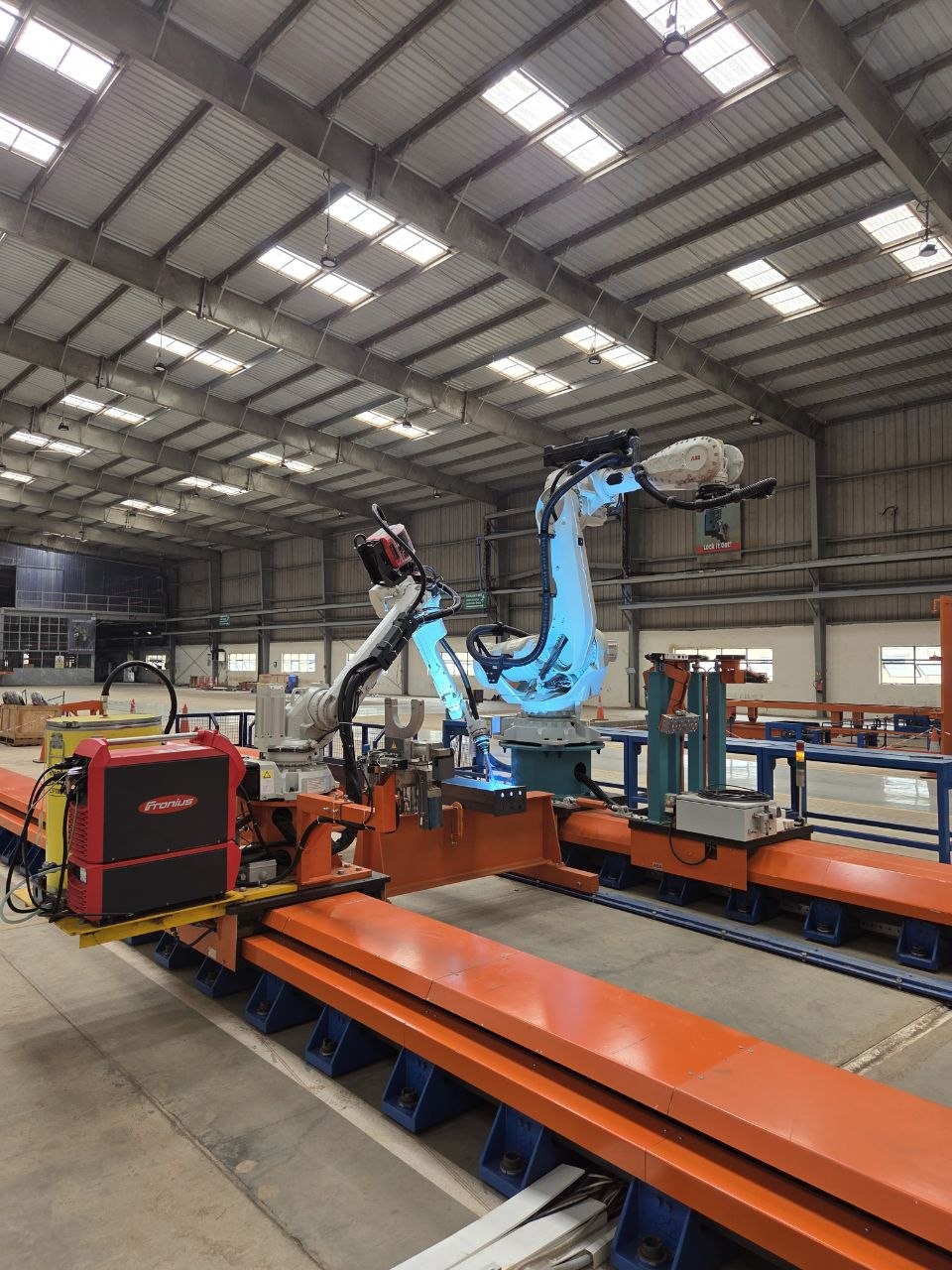
The robots perform fit-up, tack welding, and finish welding for supported components. TouchSense locates the weld before the welding pass. The current configuration does not continuously track the seam during welding or correct the weld path from a laser scan.
Operators review the match and choose whether to continue; they do not manually edit component placement. A supervisor or production engineer reviews exceptions that require an engineering decision. Supported versions and export requirements are specified during project engineering.
Engineering Solution
A comprehensive robotic welding system designed from the ground up to address the unique challenges of heavy industrial welding operations.
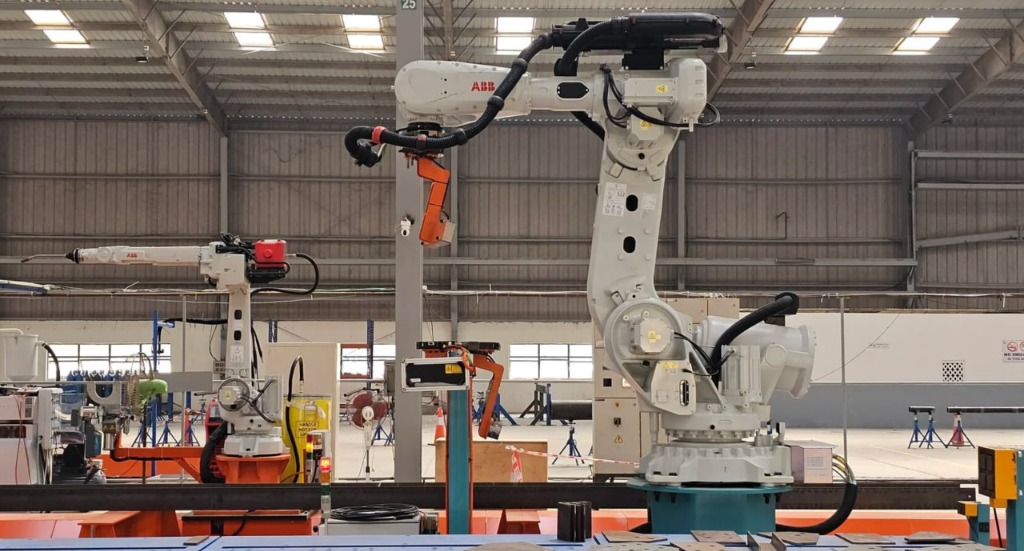
Relocated Robot Controllers
Strategic relocation of robot controllers away from the platform reduces vibration interference and improves system reliability.
Enhanced stabilityIncreased Mobility & Maintenance
Modular design enables easier maintenance access and provides flexibility for future system upgrades and reconfigurations.
Future-proof designWe increase the efficiency of enterprises with industrial robots
One of the ways to increase efficiency is automation. Quant Robotics developed dynamic software, which allowed to work for manufacturers of metal structures with single assemblies.
The software prepares supported beam jobs without manually teaching every beam. Engineers and operators still review job data, weld settings, and exceptions.
QUANT STEELFAB is a robotic complex for assembly and welding steel beams which developed for structural steel fabrication shops.
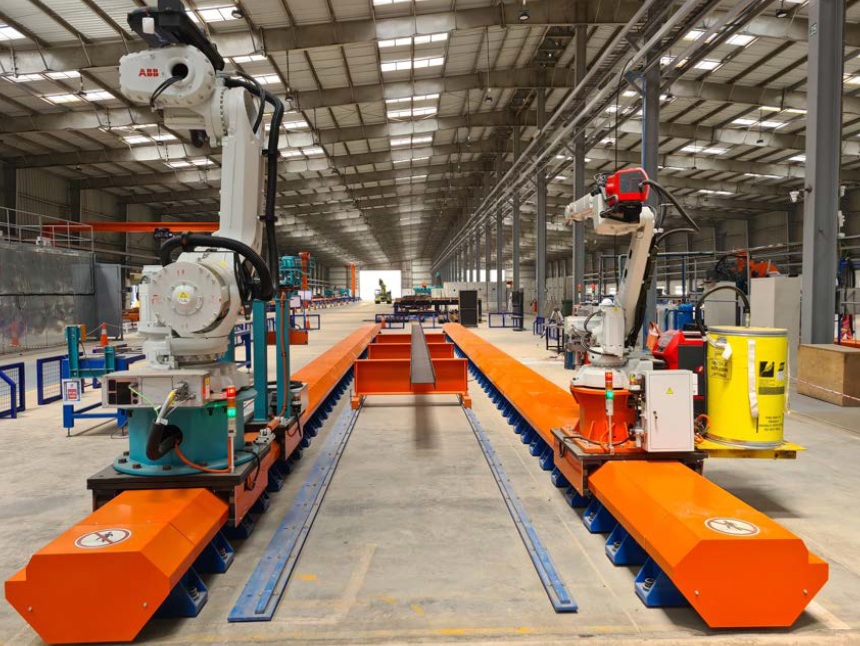
Complex consists of:
- 1Assembly robot
- 2Welding robot
- 3Quick tool change
- 4Dynamic software compatible with Tekla
Technical specificationsBeam profiles
The standard supported beam length is 3,000–12,000 mm for the listed profile types. Width and height refer to the profile cross-section.
| Main beam profile | Standard length (mm) | Width (mm) | Height (mm) |
|---|---|---|---|
I- and H-beams | 3,000–12,000 | 160–400 | 160–650 |
U-channels | 3,000–12,000 | 180–400 | 100–300 |
Square and rectangular hollow sections | 3,000–12,000 | 100–300 | 100–400 |
I- and H-beams
- Standard length
- 3,000–12,000 mm
- Width
- 160–400 mm
- Height
- 160–650 mm
U-channels
- Standard length
- 3,000–12,000 mm
- Width
- 180–400 mm
- Height
- 100–300 mm
Square and rectangular hollow sections
- Standard length
- 3,000–12,000 mm
- Width
- 100–300 mm
- Height
- 100–400 mm
- Extended beam length — project option
- Up to 14,000 mm with extended tracks, available for either model.
- Maximum beam mass
- 6 tonnes, including the STEELFAB 360 rotator configuration.
Added parts
Supported added-part dimensions are 120–700 mm long, 80–500 mm wide and 4–40 mm thick.
- Flat plates
- L profile
- U profiles
- Square tubes
Suitability for a particular added part depends on its shape, material, thickness and selected gripper.
Cell footprint
Both models have the same footprint, including protective fencing.
Length × width × height · mm
- Standard configuration
- 21,000 × 6,700 × 3,000
- Extended tracks · beams up to 14 m
- 23,000 × 6,700 × 3,000
Additional clearance for beam loading and unloading, crane movement and service access is determined for the customer's site.
Welding scope
The system supports corner and t-joint configurations with horizontal and vertical welds.
Fillet weld leg size
- Single pass
- 3–6 mm
- Multiple passes
- 8–14 mm
Weld access and the applicable procedure are reviewed for each part.
Crane-Assisted Manual Beam Rotation
The software shows the beam and holders in the next setup. The operator releases the clamps, turns the beam with an overhead crane, checks its X/Y position, reclamps it, and confirms the setup in the software. Crane availability can affect the changeover.
Key Engineering Innovations
Breakthrough technologies that redefine industrial robotic welding capabilities
Manual Beam Rotation
The operator follows the 3D setup guide, releases the beam, turns it by crane, checks X/Y alignment, reclamps it, and confirms the setup. QUANT STEELFAB 360 uses an operator-initiated rotator for this step.
High Robot Mobility
Enhanced positioning flexibility with modular platform design
Full 3D Model Integration
Complete digital twin for simulation and optimization
System in Operation
Witness the precision and efficiency of QUANT STEELFAB in real-world production environments